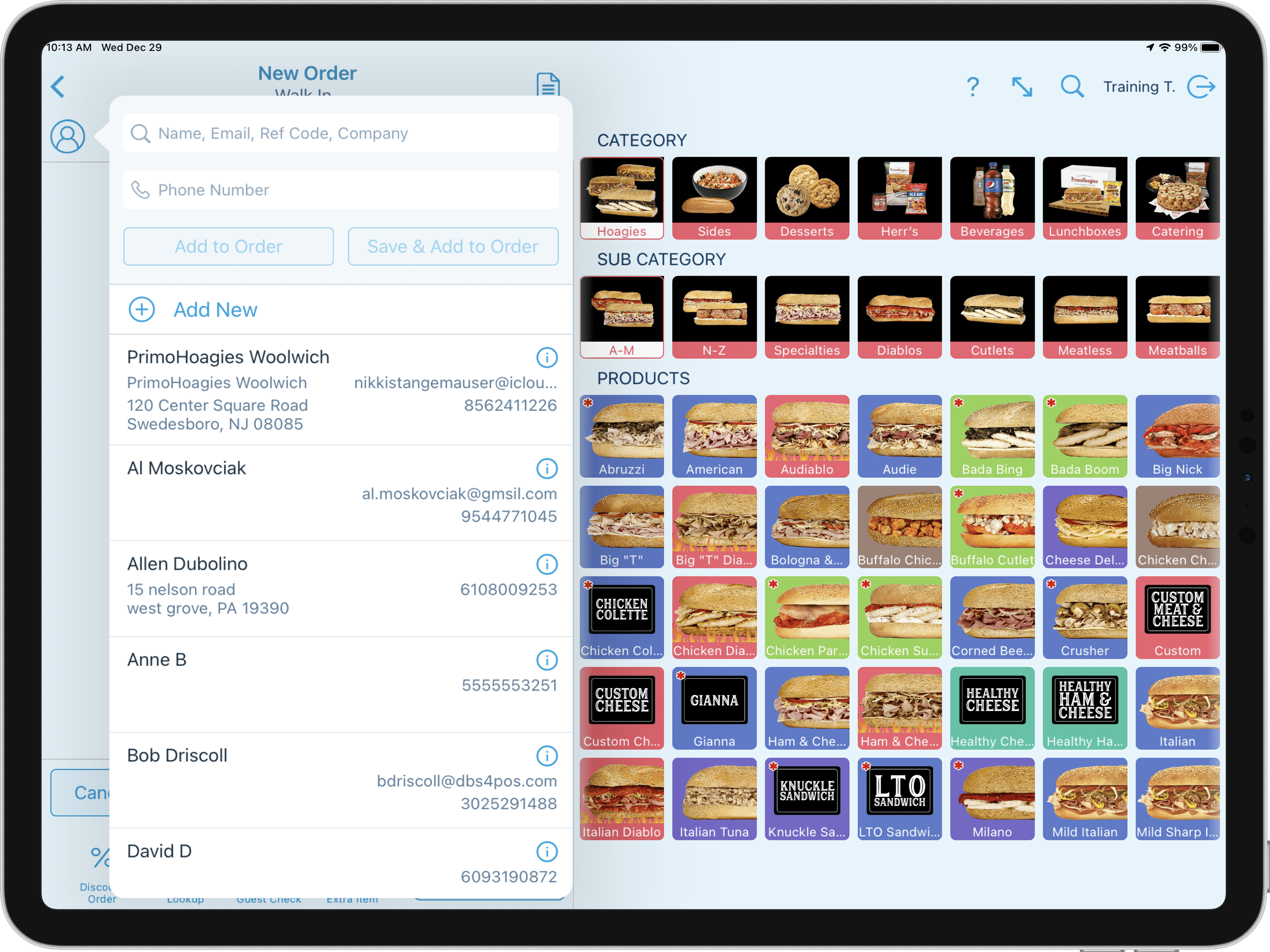
We want you to get the most out of your point of sale. Watch the following videos and learn the basics of Revel Systems & various integrations. Additional videos & guides are also available in additional PrimoHoagies University categories. Select a topic to expand or collapse. At the end of the onboarding page, you will be required to complete the PrimoHoagies Revel Systems Certification Exam prior to installation of your new point of sale system.
#1 | Revel Advantage XT Portal
In this video, we will look at the Revel Advantage XT Portal. We will cover logging into the...
Summary (6:34)
In this video, we will look at the Revel Advantage XT Portal. We will cover logging into the portal, viewing your credit card batches and statements, as well as handling chargeback and other support needs.
For existing establishments, this portal will replace the previously used Worldpay IQ Portal.
If you need further assistance please reach out to our support teams by email at primo@dbs4pos.com or by calling 302.395.0900 extension 5.
Updated 03/06/2024
↑ Close Section ↑
#2 Revel Hardware Components
In this video, we will take a look at the standard cashier harware components and...
Summary (2:07:08)
In this video, we will explore the front end point of sale as a manager and cashier. We will cover everything from starting an order, adding products, paying out orders, recalling orders, and much more.
Video Updates The following contains updates after this training video was created.
Retail Product Category: The Retail product category has been added to the POS order screen with a Reusable Bag for purchase. Popular Products Sub-Categories: The Popular products sub-categories have been added to the POS order screen under select categories. These products are the most commonly used throughout the brand. Add Ons Product Category: The Add Ons product category has been added to the POS order screen with an Add On product that can be used to indicate to the slicer that the ordered products are being added onto the existing order. There is also a More w/ Order product if needed to indicate that there are additional products for the order that may not be on the print ticket. Catering Trays: Ordering catering trays has been redesigned with the Revel Systems 2.76 release. The catering tray system now combines the products and modifiers into one simple screen designed for speed and accuracy. Donate Action Button: The Donate Action Button has been added between October and December. This button is used for the PrimoCares donation program and allows the user to add a dollar amount or change to the order for donation. Como Loyalty POS Dashboard Button: The Como Loyalty point of sale dashboard button has been added. This takes you to the login page of the Como Loyalty portal. Submit Discounts POS Dashboard Button: The Submit Discounts point of sale dashboard button has been added. This can be used to submit new store discounts to the programming support team. 3rd Party Access POS Dashboard Button: The 3rd Party Access point of sale dashboard button has been added. This can be used to submit employee additions or removals from DBS supported 3rd party applications. Activating Gift Cards Thru the POS Dashboard: Activating a gift card, such as a promo card that would not be paid for, thru the POS Dashboard is no longer available. Please sell promotional cards on an order and close to the Gift Card Donation payment type under the Custom payment option. Donation Prompting on the Customer Display: Donation prompting on the customer display is only available on Revel POS App version 2.78 due to be released in December 2023.
If you need further assistance please reach out to our support teams by email at primo@dbs4pos.com or by calling 302.395.0900 extension 5.
Updated 11/16/2023
↑ Close Section ↑
#4 Revel Customer Displays
In this video, we look at the customer display system otherwise know as the CDS...
Summary (3:25)
In this video, we look at the customer display system otherwise know as the CDS. We will review the advertisements, viewing orders, adding customer loyalty, and much more.
If you need further assistance please reach out to our support teams by email at primo@dbs4pos.com or by calling 302.395.0900 extension 5.
Updated 07/15/2022
↑ Close Section ↑
#5 Revel Dashboard Portal
In this video, we explore the PrimoHoagies Dashboard. The dashboard links you...
Summary (5:49)
In this video, we explore the PrimoHoagies Dashboard. The dashboard links you to all Revel Systems related integrations, PCI assistance, and our PrimoHoagies University.
If you need further assistance please reach out to our support teams by email at primo@dbs4pos.com or by calling 302.395.0900 extension 5.
Updated 07/15/2022
↑ Close Section ↑
#6 Revel Management Console
In this video, we cover everything from navigating the Revel Systems Management Console...
Summary (55:41)
In this video, we cover everything from navigating the Revel Systems Management Console, to viewing reports, entering employees, and payroll.
Video Updates The following contains updates after this training video was created.
DoorDash Drive Tip Reporting: With the DoorDash Drive integration, a monthly invoice will be sent to the establishment indicating the fees charged to the business for the service. For tip reporting practices please see the DoorDash Drive guide under the Management Console Access training.
If you need further assistance please reach out to our support teams by email at primo@dbs4pos.com or by calling 302.395.0900 extension 5.
Updated 07/15/2022
↑ Close Section ↑
#7 Tenzo Reporting
In this video, we will look at the Tenzo Reporting integration which includes navigating...
Summary (23:30)
In this video, we will look at the Como Loyalty platform for all of your guest marketing needs. Learn how to manage customers and create SMS offers.
If you need further assistance please reach out to our support teams by email at primo@dbs4pos.com or by calling 302.395.0900 extension 5.
Updated 07/15/2022
↑ Close Section ↑
Certification Exam
Now that you have completed the onboarding training videos, its time to get certified.
Contact DBS to get your FREE POS DEMO and experience the difference of working with a local POS expert.
PrimoHoagies Support Announcement
Establishments now using the Doubletime Online Ordering Platform with Revel Systems will need to temporarily send refund requests to primo@dbs4pos.com. You can no longer trigger a refund by reopening the order and deleting the payment at the POS level. Deleting the payment and products will not submit the actual refund to the customers account. In the near future, your PrimoHoagies Franchisee Portal will have the ability to submit the refund without the need to contact DBS.
For any questions related to Chowly (ex: GrubHub, UberEats, DoorDash), Online Ordering (including DoorDash Drive), and the Como Loyalty Platform – please reach out to your corporate team.
We will update the PrimoHoagies University Training Platform soon with this information.
Contact PrimoHoagies Training Team
Get More Information
Our POS experts will reach out to you shortly!
Contact PrimoHoagies Support
Get text notifications about your account & important system information.